***
title: Webhooks
slug: webhooks
last-updated: 'February 24, 2026'
---------------------------------
ShipBob webhooks automatically notify your app when key events occur, allowing you to keep your data in sync.
## Getting Started
Create a [webhook](/api/webhooks/create-subscription) to subscribe to an event and define a **subscription URL**.
When the event occurs, ShipBob sends a `POST` request to your **subscription URL** with relevant data.
Your system should return a `2XX` response to confirm successful receipt.
If no `2XX` response is received, ShipBob **retries delivery** using an **exponential backoff strategy**.
***
## Key Concepts
* **Subscription**: A request to receive webhook notifications at a specified URL.
* **Subscription URL**: The endpoint where webhook data is sent.
* **Event**: A trigger that generates webhook data (e.g., an order being shipped).
* **Topic**: The category of event data being sent.
* **Payload**: The actual event data sent in the webhook.
* **Response**: A `2XX` HTTP response is required to confirm webhook receipt.
***
## Common Use Cases
* ✅ **Real-time Order Tracking** - Receive `order.shipped` and `order.shipment.delivered` events to provide live tracking updates to customers.
* ✅ **Inventory Management** - Monitor `order.shipment.exception` events to detect and respond to stock shortages.
* ✅ **Return completed notifications** - Use `return.completed` events to update your system when a return has successfully been processed and completed by ShipBob.
***
## Webhook Topics & Events
| **Topics** | **Description** | **Scopes Required** |
| -------------------------- | ----------------------------------------------------------------------------------------------------------------------------------------------------------------------- | ------------------------------------ |
| `order.shipped` | Fires when a shipping label is purchased and printed. If the order is split into multiple shipments, this fires when all the labels in the shipments have been printed. | `orders_read` |
| `order.shipment.delivered` | Fires when a shipment is delivered to the customer. | `orders_read` or `fulfillments_read` |
| `order.shipment.exception` | Fires when a shipment is moved to exception status (e.g., out-of-stock items). | `orders_read` or `fulfillments_read` |
| `order.shipment.on_hold` | Fires when a shipment moves to **On-Hold** status due to missing information (e.g., address issue, payment issue). | `orders_read` or `fulfillments_read` |
| `order.shipment.cancelled` | Fires when a shipment is canceled. Does **not** fire for orders manually created on the dashboard. | `orders_read` or `fulfillments_read` |
| `return.created` | Fires when a return is created. | `returns_read` |
| `return.updated` | Fires when a return is updated. | `returns_read` |
| `return.completed` | Fires when a return is completed. | `returns_read` |
| **Topic (1.0, 2.0)** | **Description** | **Scopes Required** |
| -------------------- | ----------------------------------------------------------------------------------------------------------------------------------------------------------------------- | ------------------------------------ |
| `order_shipped` | Fires when a shipping label is purchased and printed. If the order is split into multiple shipments, this fires when all the labels in the shipments have been printed. | `orders_read` |
| `shipment_delivered` | Fires when a shipment is delivered to the customer. | `orders_read` or `fulfillments_read` |
| `shipment_exception` | Fires when a shipment is moved to exception status (e.g., out-of-stock items). | `orders_read` or `fulfillments_read` |
| `shipment_onhold` | Fires when a shipment moves to **On-Hold** status due to missing information (e.g., address issue, payment issue). | `orders_read` or `fulfillments_read` |
| `shipment_cancelled` | Fires when a shipment is canceled. Does **not** fire for orders manually created on the dashboard. | `orders_read` or `fulfillments_read` |
***
## Webhook Headers
ShipBob sends webhook notifications with the following headers:
```json
{
"x-webhook-topic": "order.shipment.on_hold",
"webhook-timestamp": "1755884852",
"webhook-signature": "v1,5BO0uMAu1XYGkAJOpZb0Piel11YaChVEZCpXY6mwUMA",
"webhook-id": "msg_31eW7bWRi16lL0Ajjik68kfyeUh",
"content-type": "application/json"
}
```
```json
{
"shipbob-subscription-id": "1582",
"shipbob-topic": "order_shipped",
"content-type": "application/json"
}
```
***
## Webhook Payloads
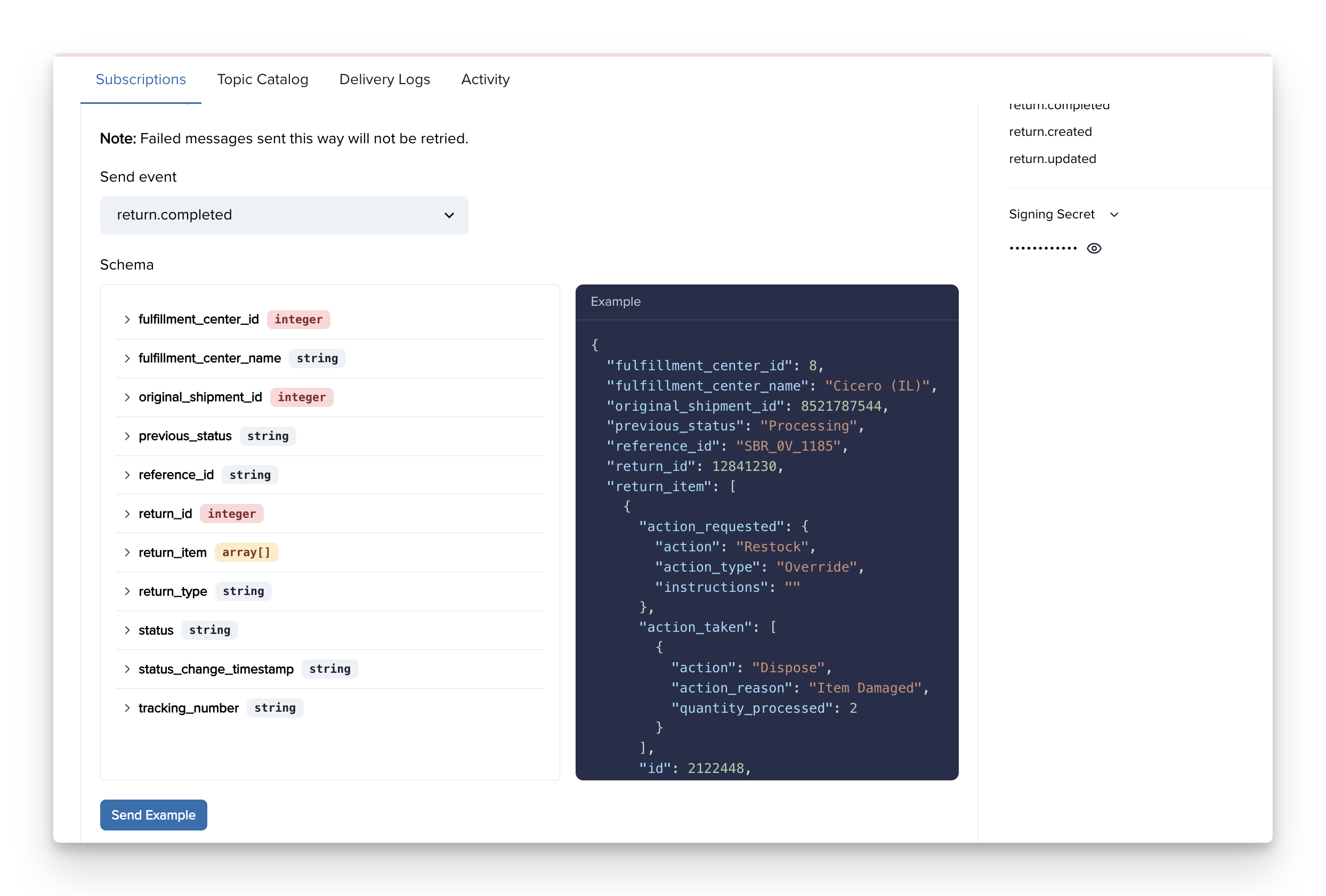
✨ **The best way to see examples of webhook payloads** is to create a webhook in the **ShipBob Dashboard** by going to:\
**Integrations → Webhooks → Create new subscription**.
1. **Add your subscription URL** — this is the endpoint on your server where ShipBob will send the webhook data.
2. **Select a topic** — choose an event type such as `order.shipped` or `return.completed`.
3. **Click “Send example”** — ShipBob will immediately send a **sample JSON payload** to your URL so you can preview the structure.
This approach makes it easy to **test your integration**, **validate your endpoint**, and **understand the exact payload format** without waiting for a real event to occur.
 ***
## Retry Schedule
Each message is attempted based on the following schedule, where each period is started following the failure of the preceding attempt:
* Immediately
* 5 seconds
* 5 minutes
* 30 minutes
* 2 hours
* 5 hours
* 10 hours
* 10 hours (in addition to the previous)
If an endpoint is removed or disabled delivery attempts to the endpoint will be disabled as well.
For example, an attempt that fails three times before eventually succeeding will be delivered roughly 35 minutes and 5 seconds following the first attempt.
**Indicating successful delivery**
The way to indicate that a webhook has been processed is by returning a 2xx (status code 200-299) response to the webhook message within a reasonable time-frame (15s). Any other status code, including 3xx redirects are treated as failures.
**Failed delivery handling**
After the conclusion of the above attempts the message will be marked as Failed for this endpoint, and the webhook sender's account will get email notification for notifying them of this error.
**Manual retries**
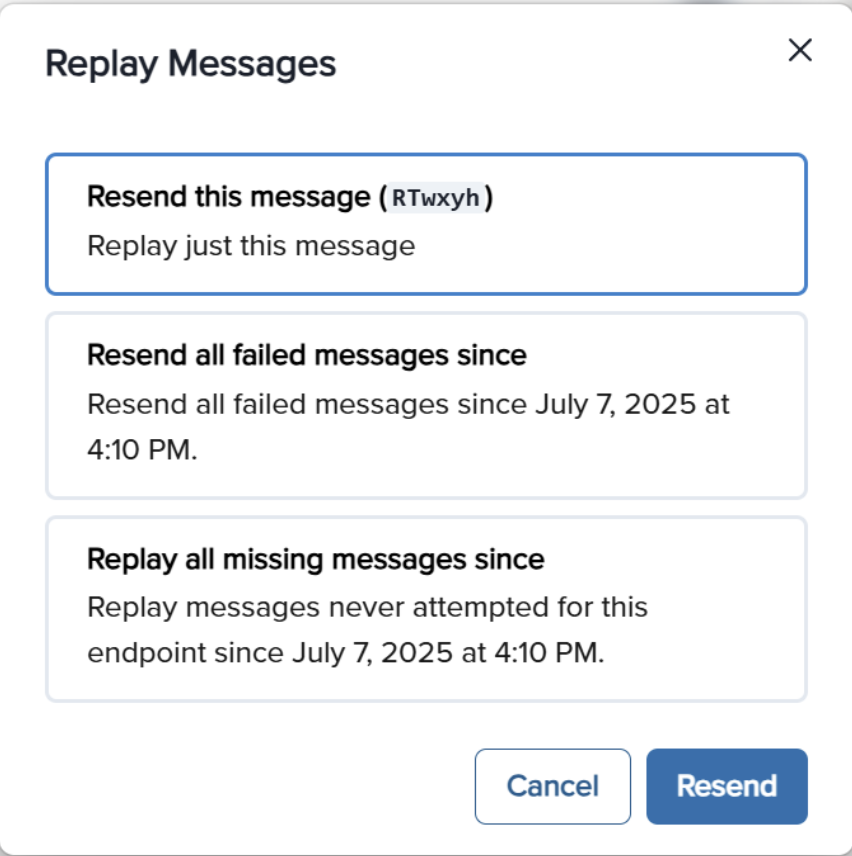
You can also use the application portal to manually retry each message at any time, or automatically retry ("Recover") all failed messages starting from a given date.
***
## Retry Schedule
Each message is attempted based on the following schedule, where each period is started following the failure of the preceding attempt:
* Immediately
* 5 seconds
* 5 minutes
* 30 minutes
* 2 hours
* 5 hours
* 10 hours
* 10 hours (in addition to the previous)
If an endpoint is removed or disabled delivery attempts to the endpoint will be disabled as well.
For example, an attempt that fails three times before eventually succeeding will be delivered roughly 35 minutes and 5 seconds following the first attempt.
**Indicating successful delivery**
The way to indicate that a webhook has been processed is by returning a 2xx (status code 200-299) response to the webhook message within a reasonable time-frame (15s). Any other status code, including 3xx redirects are treated as failures.
**Failed delivery handling**
After the conclusion of the above attempts the message will be marked as Failed for this endpoint, and the webhook sender's account will get email notification for notifying them of this error.
**Manual retries**
You can also use the application portal to manually retry each message at any time, or automatically retry ("Recover") all failed messages starting from a given date.
 ## Disabling failing endpoints
If all attempts to a specific endpoint fail for a period of 5 days, the endpoint will be disabled and an email will be sent to the account owner. The clock only starts after multiple deliveries fail within a 24-hour span, with at least 12 hours difference between the first and the last failure.
***
## Static Source IP Addresses
In case your webhook receiving endpoint is behind a firewall or NAT, you may need to allow traffic from static IP addresses.
This is the full list of IP addresses that webhooks may originate from.
```
44.228.126.217
50.112.21.217
52.24.126.164
54.148.139.208
2600:1f24:64:8000::/56
```
***
## Best Practices
✅ **Use HTTPS** - Subscription URLs **must** support SSL. Use RequestBin for testing if needed.
✅ **Implement Redundancy** - Webhooks **may be delayed or lost**. Use `GET` endpoints to periodically reconcile data.
✅ **Retry Handling** - Events **may arrive out of order** due to retries—handle them as independent updates.
✅ **Use Idempotency** - Store webhook event `id`s and discard duplicates to prevent redundant processing.
✅ **Logging & Monitoring** - Log webhook requests and responses to diagnose issues.
***
## Troubleshooting Guide
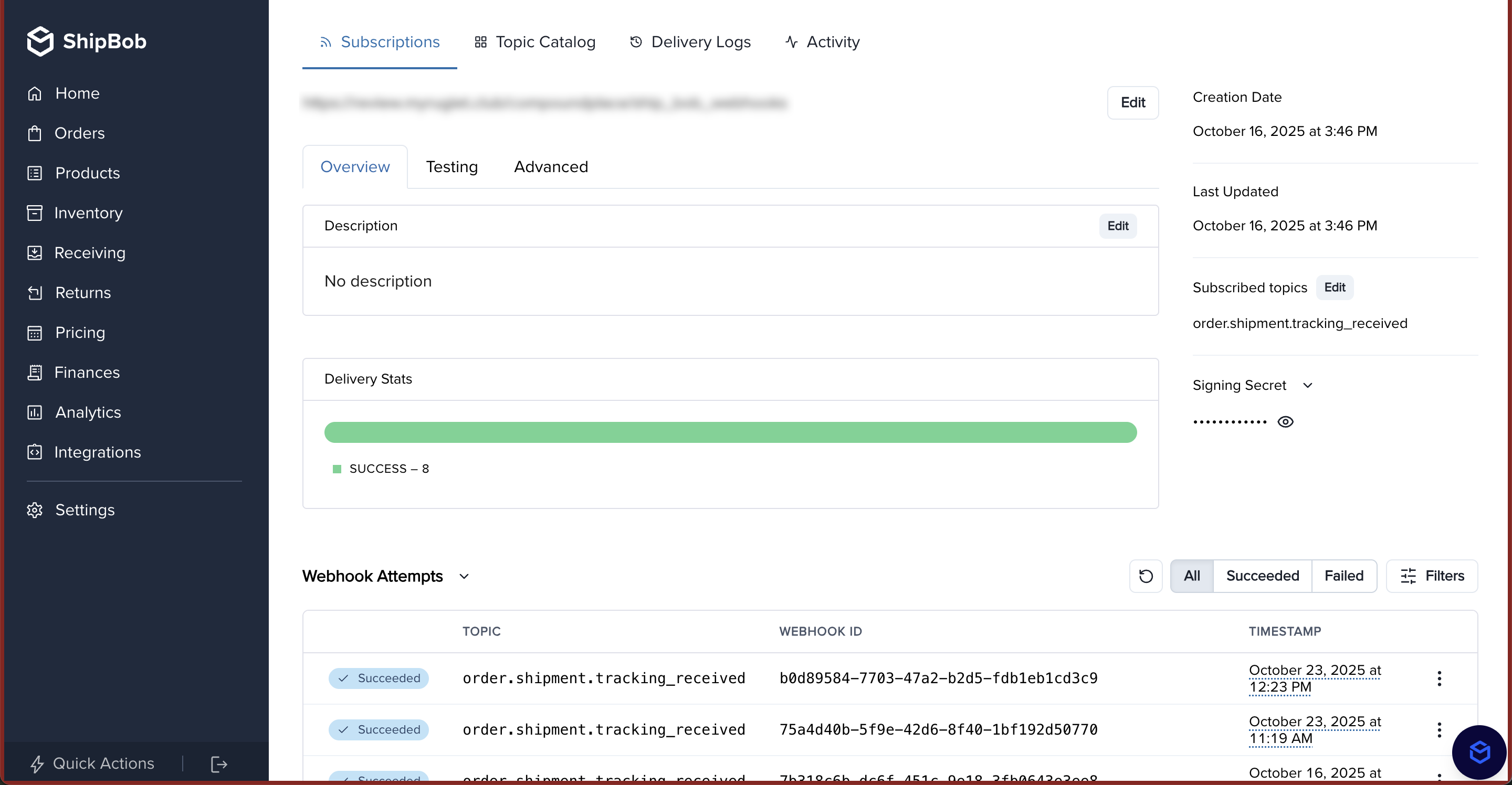
Yes, you can view webhook logs in the ShipBob dashboard by going to **Integrations** > **Webhooks**. Then, click into your webhook and you will be able to see logs at the bottom of the page.
* Ensure your **subscription URL is correct** and **publicly accessible**.
* Confirm your app **`returns a 2XX response`** to ShipBob’s `POST` request.
* Verify that your app **`has the correct webhooks_read or webhooks_write permissions`**.
* Ensure your system **processes events efficiently** and responds within **5 seconds**.
* Return a `2XX` response **before** doing heavy processing.
* Use timestamps from the payload to **sort events properly**.
* Handle events **individually**, rather than relying on strict order.
* Webhooks **are not guaranteed to be sent only once**.
* Implement **idempotency checks**: Store received event IDs and ignore duplicates.
## Disabling failing endpoints
If all attempts to a specific endpoint fail for a period of 5 days, the endpoint will be disabled and an email will be sent to the account owner. The clock only starts after multiple deliveries fail within a 24-hour span, with at least 12 hours difference between the first and the last failure.
***
## Static Source IP Addresses
In case your webhook receiving endpoint is behind a firewall or NAT, you may need to allow traffic from static IP addresses.
This is the full list of IP addresses that webhooks may originate from.
```
44.228.126.217
50.112.21.217
52.24.126.164
54.148.139.208
2600:1f24:64:8000::/56
```
***
## Best Practices
✅ **Use HTTPS** - Subscription URLs **must** support SSL. Use RequestBin for testing if needed.
✅ **Implement Redundancy** - Webhooks **may be delayed or lost**. Use `GET` endpoints to periodically reconcile data.
✅ **Retry Handling** - Events **may arrive out of order** due to retries—handle them as independent updates.
✅ **Use Idempotency** - Store webhook event `id`s and discard duplicates to prevent redundant processing.
✅ **Logging & Monitoring** - Log webhook requests and responses to diagnose issues.
***
## Troubleshooting Guide
Yes, you can view webhook logs in the ShipBob dashboard by going to **Integrations** > **Webhooks**. Then, click into your webhook and you will be able to see logs at the bottom of the page.

* Ensure your **subscription URL is correct** and **publicly accessible**.
* Confirm your app **`returns a 2XX response`** to ShipBob’s `POST` request.
* Verify that your app **`has the correct webhooks_read or webhooks_write permissions`**.
* Ensure your system **processes events efficiently** and responds within **5 seconds**.
* Return a `2XX` response **before** doing heavy processing.
* Use timestamps from the payload to **sort events properly**.
* Handle events **individually**, rather than relying on strict order.
* Webhooks **are not guaranteed to be sent only once**.
* Implement **idempotency checks**: Store received event IDs and ignore duplicates.